How to Write a Script for a YouTube Video That Gets Views
Learn how to write a script for a YouTube video with this complete guide. Get actionable tips and frameworks to craft scripts that boost views and retention.
A good YouTube script is the secret weapon behind almost every great video. It's the blueprint that guides everything: what you say, what you show, and how you edit it all together. Think of it less like a rigid teleprompter read-out and more like a strategic game plan for turning a cool idea into a video that actually gets watched.
So, Why Bother Scripting? It's Your Ticket to Beating the Algorithm
A lot of creators make the mistake of thinking a script is just for remembering lines. That's a tiny part of it. In reality, a killer script is the most critical piece of the puzzle for a video's success. It directly impacts your audience retention, which is the main signal you send to the YouTube algorithm.
When you just hit record and ramble, viewers can tell. They get bored and click away, usually within the first minute. That drop-off tells YouTube your video isn't holding attention, so it stops showing it to people.
A tight script does the exact opposite. It's your architectural plan for hooking viewers from the jump and giving them a reason to stick around.
It's All About Audience Retention
Your script is where you map out the entire viewer experience. You're not just writing words; you're building a journey with a clear beginning, middle, and end. You're making a promise with your title and thumbnail, and the script is how you deliver on it.
This planning pays off in a few huge ways:
Skyrockets Your Watch Time: A script cuts out all the "ums," "ahs," and rambling tangents. You get straight to the point, packing more value into every second and keeping people watching longer.
Keeps People on Your Channel: A well-placed call-to-action (which you plan in your script!) can nudge viewers to watch another one of your videos. This is a massive signal to YouTube that you're an authority and people like your stuff.
Makes Filming and Editing Way Easier: Seriously, this is a big one. When your script includes notes for B-roll, on-screen text, and visuals, your production process becomes incredibly smooth. You stop guessing and start creating with a clear plan.
A script isn't a cage for your creativity. It’s the launchpad that gives your ideas the structure they need to really take off. It’s what turns a casual chat into a powerful piece of content.
At the end of the day, the words you put on the page translate directly into channel growth. Scripting is about intentionally designing an experience that respects your viewer's time, delivers clear value, and tells the algorithm your content is the real deal. It’s the difference between hoping for views and actually engineering them.
The Four Pillars of an Unskippable Script
Let’s be honest, every great YouTube video script isn’t born from a stroke of genius. It's engineered. There's a proven structure behind the videos that hook you in and refuse to let you go. Once you understand these four core pillars, you'll start crafting narratives that genuinely perform, moving past simple outlines into something far more powerful.
Think of these pillars as the blueprint: the hook, the core content, the climax, and the call to action.
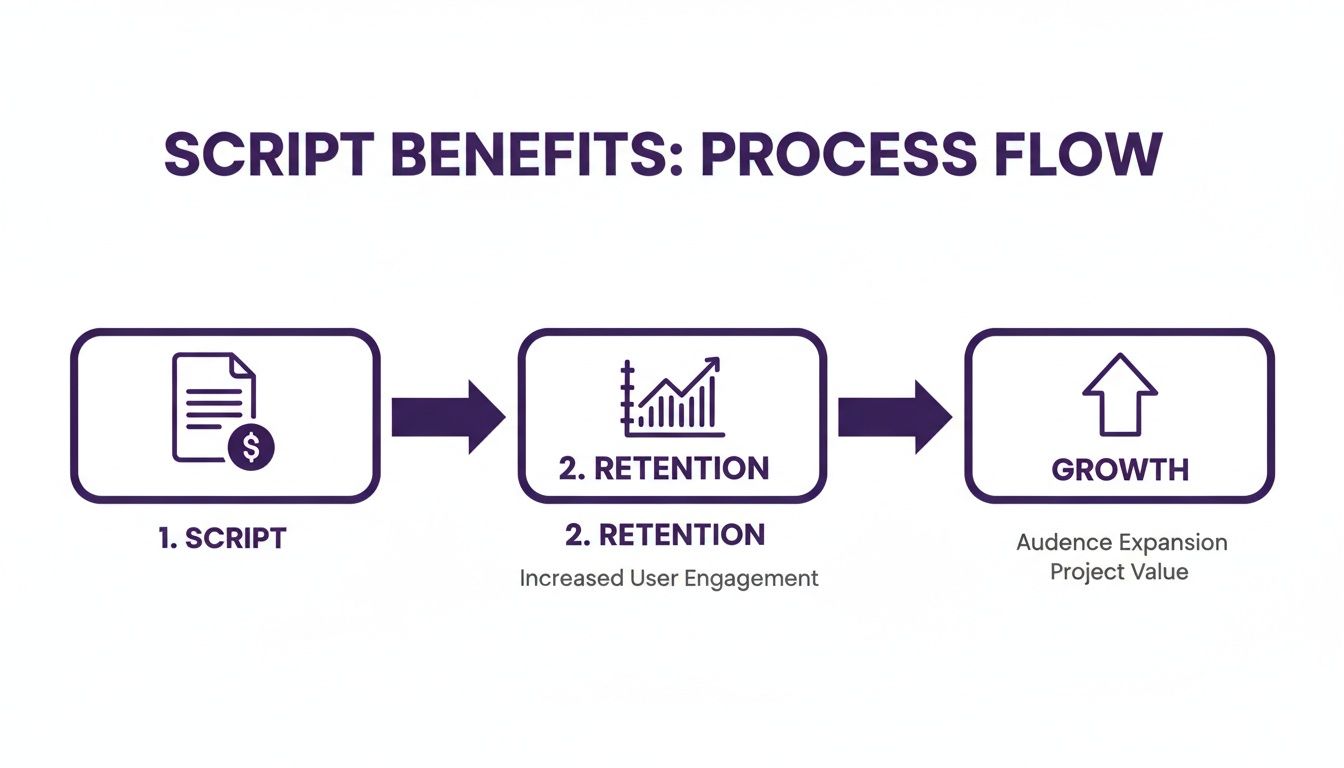
Getting this structure right is your most direct route to better performance. This flow chart really nails down how a well-thought-out script directly boosts retention, which is the engine for real, sustainable channel growth.
As you can see, it all starts with the script. Nail that, and you improve audience retention, which kicks off a chain reaction leading to genuine channel expansion.
Pillar 1: The Hook
You’ve got a tiny window, maybe 5 to 15 seconds, to convince someone they made the right click. Your hook isn't just an intro; it's the immediate payoff for the promise your title and thumbnail made. If your thumbnail is a shocked face with the text "I Lost $10,000 in 1 Day," your very first words need to dive straight into that drama.
The bond between your thumbnail and your script is everything. We know thumbnails with expressive faces can pump up click-through rates (CTR) by 20-30%, but if your script's opening falls flat, that viewer is gone. I've seen videos with an 11% CTR pull in thousands of views per hour, while others with a seemingly decent 6.7% CTR go nowhere. Your hook is what validates the click and keeps them watching.
Pillar 2: The Core Content
Okay, you've got their attention. Now it’s time to deliver the goods. The core content is where you provide the value you promised, but this isn't the time for a dry lecture or a simple list of facts. This is where you solve their problem, tell a compelling story, or lay out a killer argument.
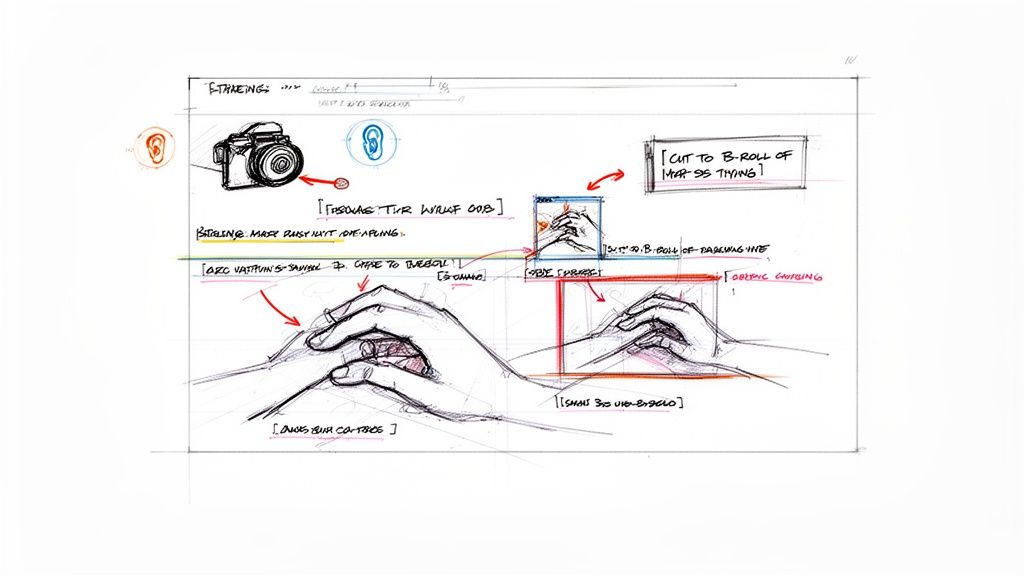
To keep people from clicking away, you have to structure your points logically and, just as importantly, keep things visually interesting. This is something you should plan right in your script. Make notes for yourself like, "Insert B-roll of the finished project here" or "Add on-screen text for this key stat." These are called "pattern interrupts," and they're absolute gold for resetting a viewer's attention span and stopping boredom in its tracks.
Your goal with the core content isn't just to inform, it's to maintain momentum. Every point should flow into the next, guiding the viewer toward that one big takeaway you want them to leave with.
Pillar 3: The Climax
Every great story has a peak, and your video is no different. The climax is the culmination of everything you've been building toward. It’s the big "aha!" moment, the final reveal of the project, or the single most crucial piece of advice you have to offer.
If you’re filming a tutorial, the climax is showing off the amazing finished product. For a commentary video, it's landing your final, most powerful conclusion. The build-up is what makes this moment work. Your core content sets the stage perfectly so that when the climax hits, it feels earned and satisfying. A powerful climax makes people feel like their time was well spent, building trust for your future videos.
Pillar 4: The Call to Action (CTA)
You've delivered the value, now what? Your script absolutely must tell your audience what you want them to do next. A Call to Action (CTA) needs to be clear, direct, and feel like a natural next step for them. Please, don't just tack on a generic "like and subscribe" at the end.
Instead, give them a logical and compelling reason to act.
Suggest another video: "If this tutorial helped you, you’re going to love my deep-dive on creating automatic video chapters, which you can watch right over here."
Invite them to your community: "For more exclusive tips that I don't share anywhere else, join my weekly newsletter."
Spark a conversation: "Let me know in the comments: what's the one thing you struggle with most when writing your scripts?"
A well-placed CTA woven seamlessly into the end of your script is how you turn a passive viewer into an active, engaged member of your community.
Scripting Templates for Popular YouTube Formats
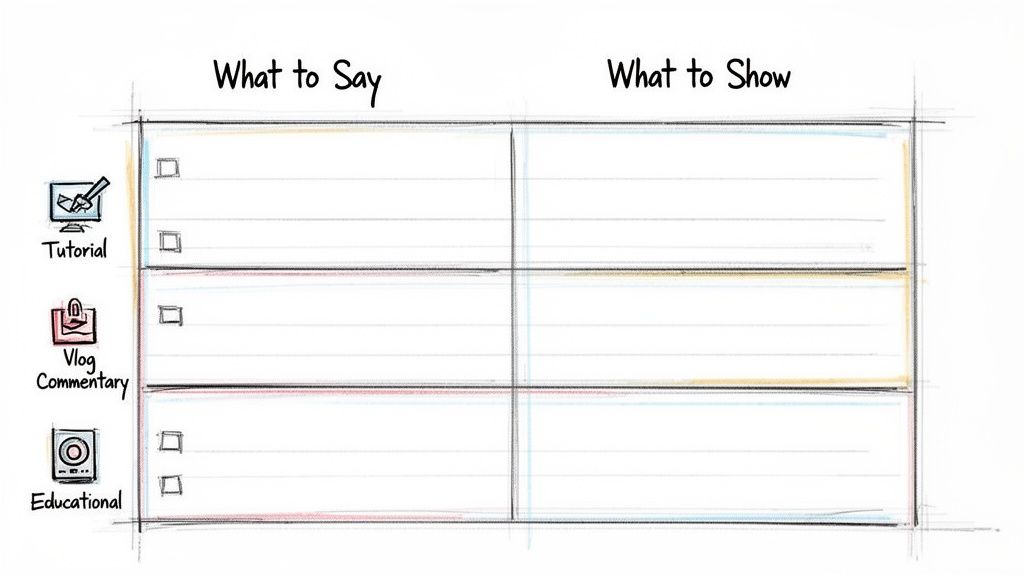
Okay, enough with the theory. Let's get practical. The single best tool I've found for scripting is a simple two-column format. It forces you to think visually right from the start, making sure that what you say lines up perfectly with what the audience sees. This is the secret to making your videos feel polished and intentional, not just like a camera pointed at a talking head.
To get you started, I've broken down four of the most common video styles on YouTube. Think of these less as rigid rules and more as battle-tested starting points. Adapt them, mix them up, and make them your own.
The Tutorial or How-To Template
When someone clicks on a tutorial, they're looking for one thing: clarity. They need to learn a skill, and your job is to guide them without any confusion. This is where the two-column script is non-negotiable. Every single instruction you speak needs an exact visual to match it on screen.
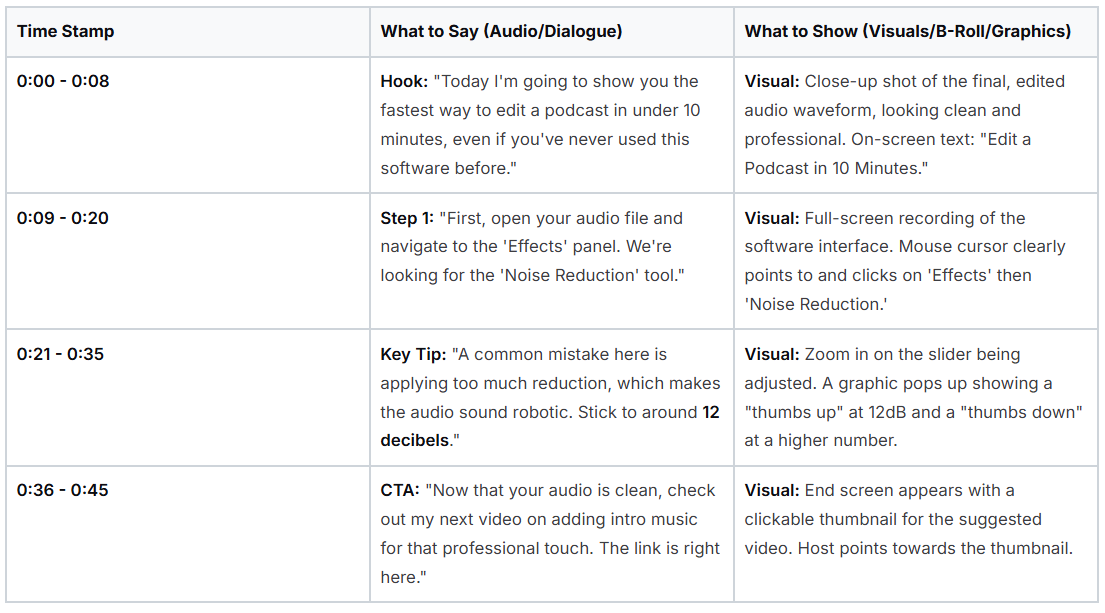
Let's look at how this plays out in a real-world script. Here’s a simple two-column layout for a tutorial video. Notice how the "What to Say" column drives the narrative, while the "What to Show" column provides the visual proof and keeps the viewer engaged.
Two-Column Script Template Example (Tutorial Format)
Script Template Example
This structure ensures there's no guesswork. You know exactly what to film and what to say, and the viewer gets a clear, step-by-step guide that’s easy to follow.
The Vlog Template
Vlogs are all about personality and telling a good story. While the best ones feel spontaneous and off-the-cuff, they almost always have a hidden structure built around an emotional arc. A script helps you plan that narrative so your B-roll isn't just filler; it actually pushes the story forward.
The Setup (Opening Scene): Jump right into the action or lead with a compelling question. What’s this vlog about? Example: "I have 24 hours to build a desk from scratch, and I have absolutely no idea what I'm doing."
The Journey (Rising Action): This is where you document the process, showing both the wins and the struggles. Don't just tell us you're frustrated; show us a time-lapse of you fumbling with a screw.
The Climax (The Payoff): Every good story needs a peak. This is the moment the desk is finished, you arrive at your destination, or you solve the problem you set out to tackle. Make sure you capture this with your best shots.
The Reflection (Falling Action & CTA): Wind down and share what you learned or how the experience felt. This is a perfect, natural spot for a CTA like, "Let me know in the comments what your biggest DIY challenge has been!"
The real power of a vlog script is in mapping out the emotional journey. Treat it like a mini-movie: you need a clear goal, a visible struggle, and a conclusion that feels earned and satisfying.
The Commentary Template
For commentary videos and video essays, your script is your argument. Your goal is to present a strong thesis and defend it with evidence, all while keeping people hooked. Without a script, it's easy to ramble. With one, your points will land with precision and impact.
Think of it as building a case, brick by brick.
The Thesis (Hook): Get straight to the point. State your main argument boldly within the first 30 seconds. Something like, "Everyone loves this new movie, but I'm here to tell you why its ending completely misses the point."
Supporting Point 1: Introduce your first piece of evidence. This is where you use clips, images, or articles to back up your claim. Your script should call out exactly when and where these visuals appear.
Supporting Point 2: Build on your argument with another piece of evidence. A great technique here is to introduce a popular counter-argument and then systematically explain why it's flawed. This makes your own position look even stronger.
The Conclusion (The "So What?"): Bring it all home. Restate your thesis, now reinforced by all the evidence you've presented. You can end with a powerful summary or a thought-provoking question that encourages discussion. The CTA here is often a direct invitation for viewers to share their own take on the topic.
The Educational Talking-Head Template
Let's be honest: talking-head videos can get boring, fast. The script is your best defense against viewer fatigue. The key is to plan for "pattern interrupts," or quick visual changes, every 30-45 seconds. This constant refresh keeps the brain engaged.
Instead of just talking to the camera for five minutes straight, your script should explicitly call out these visual breaks.
For example, your script might look like this:
Dialogue: "One study found that 73% of viewers retain information better when it's presented visually..."
Visual Cue:[CUT TO: Full-screen graphic showing a large "73%" with an icon of a brain]
Dialogue: "...this is because our brains are wired to process images much faster than text."
Visual Cue:[CUT TO: B-roll of someone sketching ideas in a notebook]
By planning these visual breaks ahead of time, you turn what could have been a static lecture into a dynamic, memorable, and much more effective learning experience.
Writing for Both the Eye and the Ear
A great YouTube script isn't just about the words you'll say. It’s a complete blueprint for the entire video. To make content that truly pops, you have to stop thinking like just a writer and start thinking like a director.
This means your script becomes more than a monologue; it's a plan. By weaving in simple staging notes like cues for B-roll, on-screen text, or camera angle changes, you transform your script into a production guide. This is the secret that separates flat, amateur videos from the polished, professional content that keeps people watching.
Weaving Visual Cues into Your Script
Adding visual notes is surprisingly easy. As you write out your dialogue, just pop in a quick description in brackets to signal what the audience should be seeing at that exact moment. This simple trick ensures your visuals and your spoken words are always working together, making your message much stronger.
Here are a couple of real-world examples:
Dialogue: "Next, you'll want to navigate to the advanced settings menu to find the audio controls."
Visual Cue:[Cut to screen recording of the settings menu, cursor highlights 'Advanced']
Dialogue: "This process requires focus and can take a bit of time to get right."
Visual Cue:[Show B-roll of hands typing on a keyboard, slightly out of focus]
Think of these notes as your shot list during filming and your roadmap during editing. They're constant reminders to grab the footage you need to break up long stretches of you just talking to the camera, which keeps the visual pace feeling fresh and dynamic.
Don't forget that "visuals" also include things like on-screen text. Planning for visual variety, like adding professional automated captions, is a huge win for both accessibility and engagement.
Aligning Your Script with Your Thumbnail
Believe it or not, the visual storytelling of your video starts before you even hit record. It begins with your thumbnail.
On a platform where creators upload roughly 4,000 videos every minute, your thumbnail is your one shot to grab a click. There's a reason 90% of the best-performing videos have custom thumbnails: they work.
Let's say your thumbnail shows a shocked face, a tactic known to boost click-through rates by 20-30%. Your script's opening lines must immediately pay off that promise. If a viewer clicks expecting drama and gets a slow, boring intro, they're gone.
The rule is simple: what you promise visually, you must deliver audibly within the first 15 seconds. This alignment between thumbnail and script is critical for turning a click into a retained viewer.
Weaving SEO into Your Scripting Process
A great script is only half the battle. If no one can find your video, does it even matter? Getting discovered on YouTube before you ever hit record.
It all starts with basic keyword research. Put yourself in your viewer's shoes: what would they type into the search bar to solve the problem your video addresses? That phrase is your target keyword. Your mission is to work that keyword into your script so it sounds completely natural.
One of the most powerful ways to rank on YouTube is to simply say your target keywords out loud in your video. YouTube automatically transcribes everything you say, and the algorithm uses that text to figure out what your content is about.
This means your main keyword needs to be part of the actual dialogue, not just an afterthought for the title and description.
Where to Place Your Keywords
The key here is to make your keywords feel like a normal part of the conversation, not like you're stuffing them in for a robot.
Here are the most critical spots to include your primary keyword:
The Hook: Say it loud and clear within the first 15-20 seconds. For example, "Today, I’m going to walk you through exactly how to write a script for a YouTube video that people will actually watch."
The Body: Weave the keyword (or close variations) into your main points 2-3 times. This happens naturally if you stay on topic.
The Wrap-Up: Mention it one last time in your conclusion or call-to-action to reinforce the video's core theme.
Following this simple structure sends strong signals to the YouTube algorithm, helping it understand your video and show it to the right audience.
Turn Your Script into SEO Gold
A well-planned script is more than just a teleprompter file; it’s a content goldmine. The work you put in upfront becomes the foundation for all the other SEO elements you need when you upload, making your publishing workflow incredibly efficient.
Think about it: the main sections of your script easily become your video chapters. Pulling out a few key sentences gives you a keyword-rich paragraph for your video description. And the core language you’ve already refined is perfect for figuring out how to optimize your video titles and tags.
This approach makes sure every single piece of your video, from the words you say to the text in your description, is perfectly aligned and working together to get you more views.
Frequently Asked Questions About Writing YouTube Scripts
Even with the best templates in hand, you're bound to run into a few questions when you actually sit down to write. It happens to everyone. Let's walk through some of the most common sticking points so you can get past the blank page and start creating.
Sometimes, the biggest hurdle is just overthinking it. Let's clear up these common questions so you can hit "record" with confidence.
How Long Should My Video Script Be?
There’s no single right answer here, but a great rule of thumb is to aim for 150 to 170 words for every minute of video you want to produce. So, if you're planning a 10-minute video, you're looking at a script somewhere between 1,500 and 1,700 words.
But honestly, the word count is less important than the pacing. A jam-packed technical tutorial is going to have a much higher word density than a cinematic travel vlog that lets the visuals do the talking.
My best advice? Read your script aloud. Time yourself. You’ll immediately get a feel for the rhythm and discover if it’s dragging or moving too fast. It's always easier to cut a script that's a bit too long than to pad out one that's too short and doesn't deliver enough value.
Should I Use a Full Script or Just Bullet Points?
This really boils down to your personal style and the type of video you're making.
If you’re just starting out on YouTube, I can't recommend a full, word-for-word script enough. It's the ultimate safety net. It keeps you from rambling, makes sure you hit all your key points, and does wonders for building your on-camera confidence. A full script is also non-negotiable for videos where precision matters, like a detailed tutorial or a deep-dive analysis.
On the flip side, seasoned creators or those filming casual, off-the-cuff vlogs often thrive with just a set of bullet points. It helps them maintain that spontaneous, conversational vibe.
A fantastic middle ground is to script your hook and your call to action, the two most critical parts of your video, and use bullet points to guide you through the middle. You get the best of both worlds: a strong start and finish with a natural flow in between.
How Do I Make My Script Sound Less Robotic?
The secret isn’t complicated: write like you talk.
Seriously, that's it. Use contractions ("it's" instead of "it is"). Toss in questions to make your audience feel like they're part of the conversation. Keep your sentences clean and direct.
The most important thing you can do is read your script out loud. Again and again.
Does a certain phrase feel clunky or awkward to say? If so, it's going to sound ten times worse on camera.
Rewrite those clunky parts until they roll off the tongue.
Don't be afraid to add personal stories or a quick opinion. That's what makes it your video.
Remember, you’re not writing a term paper. You're starting a conversation. Your genuine personality is what creates that connection with a viewer and keeps them coming back.
Ready to streamline your entire YouTube workflow, from script to publish? Thumbnail Maker uses AI to create high-performing thumbnails in seconds, and our suite of tools can also generate titles, descriptions, chapters, and captions directly from your video. Start your free trial and see how much time you can save.
Discover how to optimize YouTube videos with our complete guide. We cover everything from click-worthy thumbnails to deep analytics for ultimate channel growth.
Unlock channel growth with these 10 actionable video editing tips for YouTube. Learn to boost retention, improve CTR, and streamline your workflow today.