Mastering YouTube Watch Time to Dominate the Algorithm
Struggling to increase your YouTube watch time? Learn proven strategies to boost audience retention, optimize content, and master the YouTube algorithm.
Forget views for a second. The real magic on YouTube isn't how many people click on your video, but how long they stick around to watch it. That's YouTube watch time in a nutshell: the total, cumulative minutes and hours people spend on your content.
It’s the most powerful signal you can send to the YouTube algorithm that your stuff is actually good.
What Is YouTube Watch Time and Why It Matters
Picture your YouTube channel as a brand-new restaurant. Getting a flood of people through the door is a great start (those are your views). But the true test? How many of them actually sit down, order, and enjoy a full meal. That's your watch time. It's proof they didn't just peek inside; they loved the experience and stayed.
When someone spends significant time on your video, it tells YouTube, "Hey, this content delivered on its promise." And since YouTube's main goal is to keep people on the platform for as long as possible, you're literally helping them succeed. In return, the algorithm rewards you by showing your video to more people.
The Core Engine of Channel Growth
High watch time isn't just a number to feel good about; it's the fuel for your entire channel. It's what separates channels that struggle from those that seem to grow effortlessly.
Here’s why it’s so critical:
The Algorithm Loves It: YouTube’s recommendation engine is built to promote videos that keep people watching. More watch time means more love from the algorithm, which translates to more features on the homepage, in "Up Next" suggestions, and higher up in search results.
Massive Visibility Boost: Videos with strong watch time are flagged as high-quality. This gives them a serious advantage in search rankings, making it way easier for new viewers to find you.
The Key to Getting Paid: You can't join the YouTube Partner Program and start making money without it. The magic number is 4,000 hours of public watch time within the last 12 months. There's no getting around this milestone for long-form content.
In essence, watch time is the currency of YouTube. The more of it you earn, the more the algorithm "invests" back into your channel, kicking off a powerful cycle of discovery and growth.
When you shift your focus from just getting clicks to keeping people engaged, everything changes. You start thinking about the viewer's journey from the first second to the very last. This doesn't just make the algorithm happy; it builds a loyal audience that trusts you and keeps coming back for more. Grasping this simple idea is the first real step toward building a channel that doesn't just get views, but earns a dedicated community.
Decoding the Metrics Behind Watch Time
To really get a handle on YouTube watch time, you have to put on your detective hat and dive into your own analytics. YouTube Analytics gives you a powerful set of tools that show you exactly how people are engaging with your videos, second by second. It's not just about the total watch hours; two specific metrics really pull back the curtain on your video's performance.
Think of it this way: Average View Duration (AVD) is like your video's final grade, while the Audience Retention graph is the detailed report card showing exactly where you nailed it and where you lost people.
Average View Duration: The Big Picture
Average View Duration tells you, quite simply, how long people stick around before clicking away. If your 10-minute video has an AVD of 5 minutes, your average retention is 50%. This one number is a fantastic, at-a-glance measure of how engaging your content really is.
A higher AVD is your direct line to more total YouTube watch time. For instance, a video with a 6-minute AVD and 1,000 views racks up 6,000 minutes of watch time. To get that same result, another video with a 3-minute AVD would need 2,000 views. The algorithm almost always rewards the video that holds attention longer.
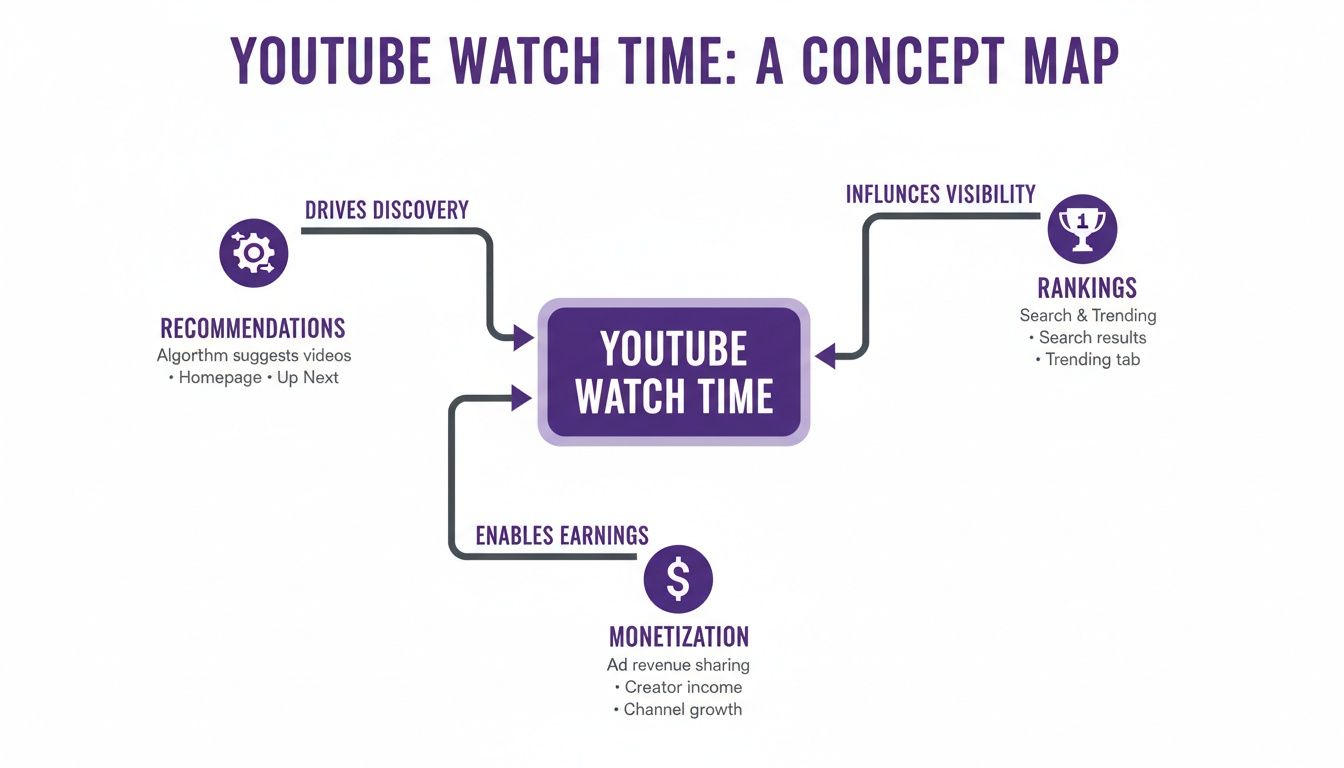
This is the engine of your channel's growth. As you can see below, watch time is the central gear that drives everything from discovery in the algorithm to your ability to monetize.
The real takeaway here is that it's all connected. When you improve your watch time, you kick off a positive feedback loop that helps your entire channel grow faster.
Reading Your Audience Retention Graph
While AVD gives you the final score, your Audience Retention graph is where the real learning begins. This graph is a goldmine, showing you the percentage of viewers still watching at any given moment in your video. Learning to read its peaks and valleys is like developing a creator superpower.
This is how you pinpoint your video's biggest wins and glaring weaknesses. Here are the common patterns you’ll see and what they mean:
A Steep Initial Drop-Off: See a massive cliff in the first 30 seconds? That’s a huge red flag. It usually means your hook didn't land, or your thumbnail and title promised something the intro didn't deliver.
A Gradual Decline: A slow, gentle downward slope is exactly what you want to see. It’s natural for people to drop off, but this pattern shows your content is holding their attention well.
Spikes and Bumps: See a little hill in the graph? That's a spot viewers rewatched. These spikes pinpoint your most valuable moments: a great joke, a critical tip, or a stunning visual. Study these to see what truly connects with your audience.
Sudden Dips: A sharp drop mid-video is your cue that something went wrong. Maybe a segment was boring, an explanation was confusing, or the energy just sagged. These are your best opportunities to learn and improve your future edits.
By dissecting your retention graph, you stop guessing what your audience wants and start using concrete data to inform your content strategy. Every dip is a lesson, and every spike is a success to replicate.
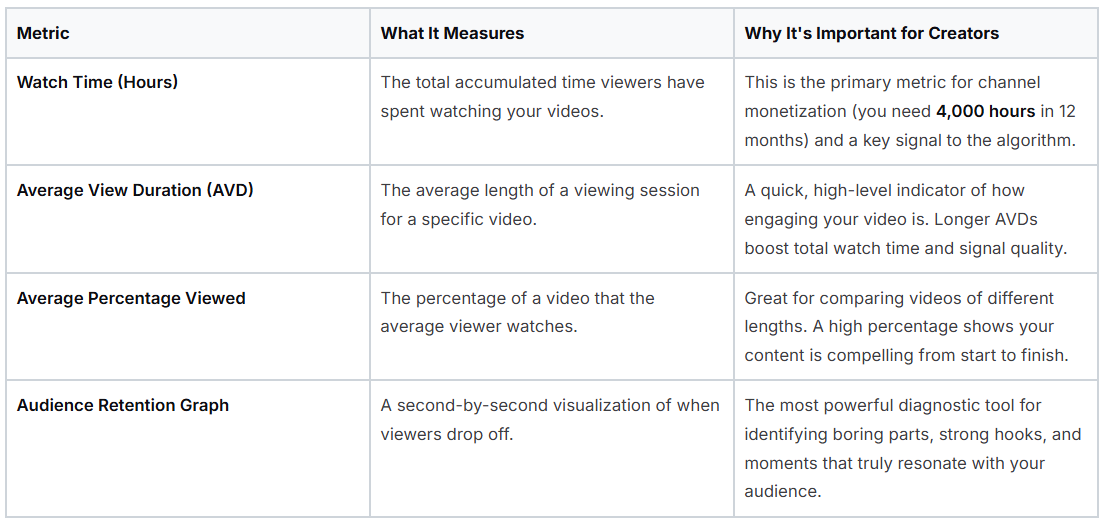
To make sense of it all, it helps to have a clear picture of the different metrics you'll find in your analytics dashboard.
Key Watch Time Metrics and What They Mean
This table breaks down the essential terms so you can quickly understand what you're looking at and why it matters for your channel's growth.
Key YouTube Metrics
Having these definitions handy will make your trips into YouTube Analytics far more productive, turning confusing data into a clear roadmap for your next video.
Long-Form Videos vs. YouTube Shorts
It's also crucial to remember that YouTube's algorithm looks at watch time differently depending on the format. For your standard long-form videos, both absolute watch time (total minutes watched) and relative retention (the percentage) are vital. A 15-minute video with 50% retention (7.5 minutes) is often seen as more valuable by the algorithm than a 3-minute video with 90% retention (2.7 minutes).
For YouTube Shorts, the game changes. Since they're so short, the algorithm prioritizes things like view-through rate (how many people watched the entire Short) and the swipe-away rate. High retention is still the goal, but it's all about delivering a quick, satisfying loop of content, not an extended viewing session.
Winning the First Impression with Thumbnails and Hooks
The journey to great YouTube watch time doesn't start when someone hits play. It starts a moment earlier, with that first crucial impression. In a feed crowded with options, your thumbnail and the first few seconds of your video are the only things standing between you and a potential viewer scrolling right on by.
Think of your thumbnail as a movie poster. Its job isn't just to look good; it has to make a promise. It needs to spark curiosity, set a clear expectation, and convince someone that your video, out of all the others, is the one worth their time.
The Power of the Promise Thumbnail
A truly effective thumbnail is more than just a random still from your video. It communicates an idea, an emotion, or a burning question. It has to be clear, instantly understandable at a small size, and create just enough of an information gap that the viewer needs to click to find out more. Getting that click is the first, non-negotiable step toward building watch time.
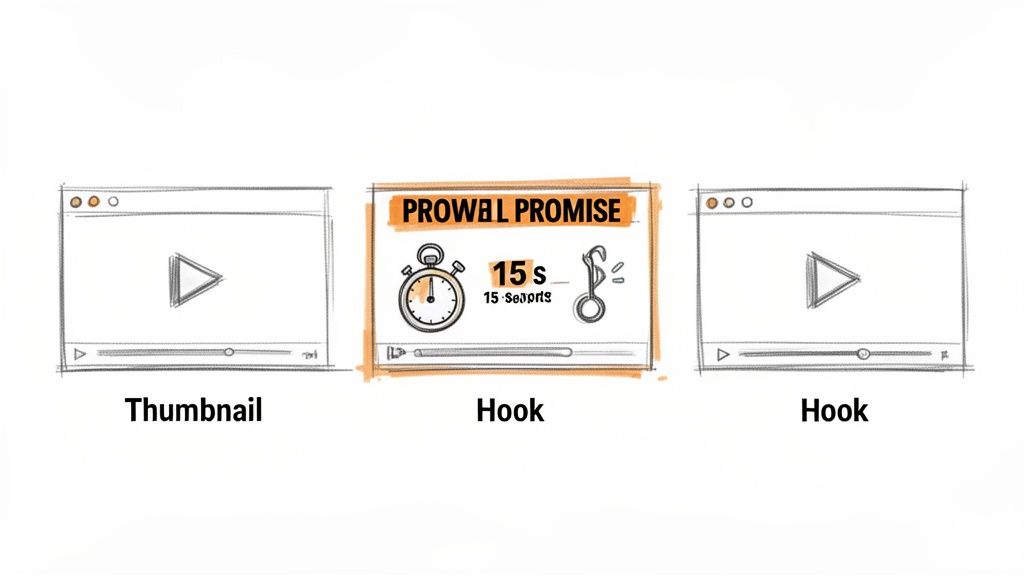
But once the thumbnail makes a promise, the video has to deliver on it, and fast. This is where the hook comes in.
Your thumbnail earns the click, but your hook earns the viewer's commitment. Mismatching the two is one of the fastest ways to lose an audience and destroy your video's retention from the start.
This dynamic is more critical than ever. Projections show that by 2025, a massive 63% of all YouTube watch time will happen on mobile devices. For creators, this is a clear signal: thumbnails need to be designed as mobile-first hooks that are compelling and easy to read, even as a tiny preview on a phone. You can dig into more of these mobile viewing trends at Awisee.com.
Crafting an Irresistible 15-Second Hook
The second a viewer clicks, a stopwatch starts. You have about 15 seconds to prove they made the right choice. A slow, rambling, or confusing intro is a guaranteed retention-killer. Your hook's job is to instantly validate the thumbnail's promise and give the audience a compelling reason to stick around.
A great hook does three things right away:
Confirms the Topic: It immediately tells the viewer they're in the right place for the content they expected.
Introduces a Question or Conflict: It presents the core problem or mystery that the rest of the video is dedicated to solving.
Foreshadows the Value: It hints at the payoff: the solution or transformation the viewer will get by watching to the end.
For instance, a DIY video shouldn't start with a long intro about the channel's history. Instead, it should immediately show the amazing finished project and say, "In the next five minutes, I'm going to show you exactly how to build this." That's how you grab attention and lock in viewership.
Optimizing Your Thumbnails for Clicks
Creating thumbnails that get clicks consistently isn't just about artistic talent; it's a science. They need to pop on every device, from a huge TV screen down to a tiny phone. This is where having the right tools makes a huge difference.
Using a platform like Thumbnail Maker can take you from a blank slate to a professional, optimized design in just a few minutes. It can analyze your video to pull out frames with the most emotional impact, add bold and readable text, and apply design principles known to work. This kind of automation helps ensure your thumbnails aren't just pretty, but are actually built to boost your click-through rate. For a deeper dive, check out our guide on YouTube thumbnail tips that boost views.
Ultimately, mastering your thumbnails and hooks is about understanding viewer psychology. You have to capture their attention with a powerful visual promise, then immediately deliver on that promise with a hook that gets straight to the point. When you win this critical first impression, you set the stage for longer sessions, higher retention, and a serious boost in your overall YouTube watch time.
Advanced Strategies to Keep Your Audience Glued to the Screen
You did it. You earned the click and got your viewer past that critical 15-second drop-off point. Now the real challenge begins: keeping them engaged all the way to the end. This is where you move from just getting views to building a real audience and seriously boosting your YouTube watch time.
These aren't just tricks for vloggers or documentarians. Whether you're making tutorials, product reviews, or deep-dive explainers, these strategies are all about managing your viewer's focus and constantly giving them a reason to stick around.
Tell a Story, Even When You're Teaching
Humans are hardwired for stories. It’s how we make sense of the world. You can tap into this fundamental part of our psychology to keep viewers from wandering off, even in the most technical videos.
A fantastic tool for this is the open loop. You introduce a question, a problem, or a tantalizing piece of information early on, but you promise to close the loop later. This creates an itch of curiosity that your viewer just has to scratch. A classic example in a tech review is opening with, "This phone is nearly perfect, but it has one fatal flaw I only found after a week... and I’ll get to that at the end."
Building suspense works just as well. You can structure your whole video to build up to a big reveal, a final verdict, or a key insight. It makes the viewer feel invested. They've come this far, and now they need to see how it ends.
Your Editing Is Your Pacing
Editing is so much more than just cutting out the "ums" and "ahs." A great edit can inject energy into a video, while a lazy one can make even the most exciting topic feel like a slog. Your goal is to create a dynamic experience that constantly resets your viewer's attention.
Here are three editing techniques that make a huge difference:
Pattern Interrupts: Think of these as a gentle tap on the shoulder for a viewer whose mind is starting to drift. A quick zoom, a funny sound effect, a meme popping up on screen, or even just a sharp cut to a different angle can break the monotony and pull their focus right back.
Meaningful B-roll: B-roll isn't just filler footage; it's your show-and-tell. Don't just talk about a concept; illustrate it with an animation. Don't just mention a feature; show a crisp close-up of it in action. Good B-roll makes your video feel less like a lecture and more like an experience.
Intentional Sound Design: Never, ever underestimate the power of sound. The right background music can set the mood and guide emotions without the viewer even noticing. A well-placed swoosh or ding can add emphasis and make key moments pop. Most importantly, clean, clear audio is an absolute must.
Think of your video's timeline not as a straight line, but as a series of peaks and valleys. Your job as a creator is to use storytelling and editing to create enough intrigue and energy to carry the viewer over every potential dip in their attention span.
Each of these elements makes your video feel more polished and professional, which signals to the viewer that your content is worth their time.
Make Your Video Easy to Navigate with Chapters
For any video over a few minutes long, viewers can feel a bit lost. Staring at a long, unbroken progress bar can be intimidating. This is exactly why YouTube chapters are such a game-changer for retention.
Chapters slice your video into logical, timestamped sections, each with a clear title. This gives your audience a roadmap right from the start. They can see exactly what you're going to cover and can jump straight to the part that’s most valuable to them.
Now, letting people skip ahead might sound like a bad thing for watch time, but it's actually the opposite. It improves the user experience so much that people are more likely to watch the sections they care about instead of just clicking away entirely. It respects their time. Adding chapters is also a huge plus for accessibility, a point we cover in our guide on how automated captions improve viewer engagement.
When you combine a great story with dynamic editing and helpful features like chapters, you create a viewing experience that pulls people in and holds them there. You’re not just dumping information; you're crafting a journey that rewards attention, and that’s the secret to truly mastering watch time.
Extending Sessions with Playlists and End Screens
Getting someone to watch one of your videos all the way through is great. But the real game-changer is boosting your channel's total session watch time. This is a powerful metric that tracks how long a viewer stays on YouTube after their journey started with one of your videos.
When you can successfully guide a viewer from one of your videos to the next, you’re doing YouTube’s job for it: keeping people on the platform longer. The algorithm loves this and rewards channels that can create these binge-watching rabbit holes.
So, stop thinking of your videos as standalone pieces. Instead, see each one as a single stop on a longer journey you've intentionally mapped out for your audience. Your two best tools for building this journey are playlists and end screens.
Turn Individual Views into Binge Sessions
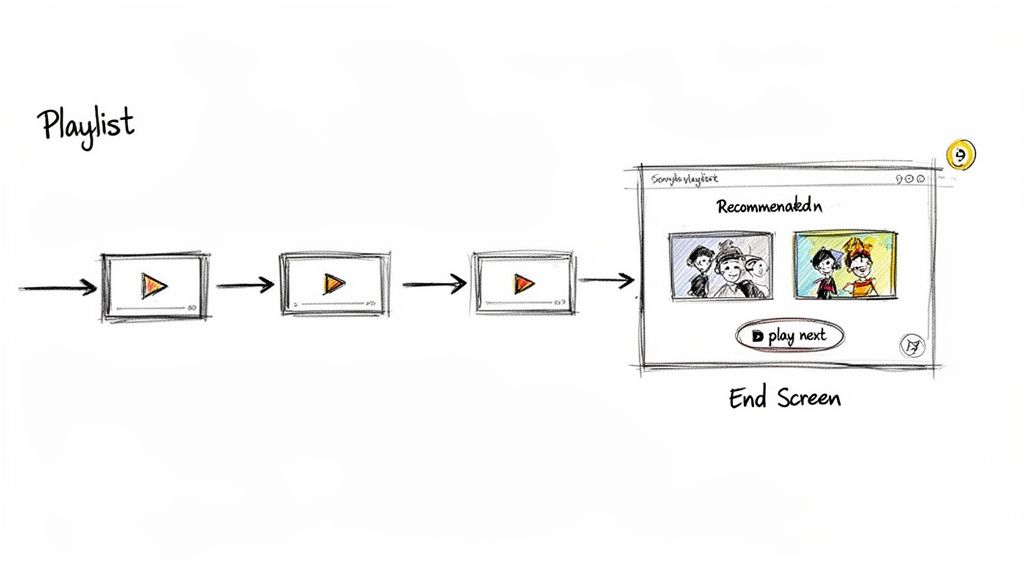
Playlists are way more than just a tidy way to organize your content. They're strategic pathways you design to keep people watching. A smart playlist takes a viewer who might have clicked away and effortlessly guides them to the next logical video, multiplying your youtube watch time without them having to lift a finger.
Here’s how to build playlists that actually work:
Create Topic-Based Series: Group all your videos on a specific subject into a binge-able series. If you have a cooking channel, think "Mastering French Sauces" or "A Beginner's Guide to Sourdough."
Order Logically: Don't just throw videos together. Arrange them in an order that makes sense: maybe chronologically, by increasing difficulty, or to follow a specific story. Your first video needs to hook them, and every video after that should build on what came before.
Promote Your Playlists: Don't hide them! Feature your best playlists right on your channel's homepage. Mention them in your videos and verbally guide people to these curated experiences.
A playlist acts like a curated TV series for your channel. When someone finishes one "episode," the next one automatically begins, multiplying your watch time and signaling to the algorithm that your channel is a valuable destination.
This strategy is especially powerful when you consider where people are watching. TV viewing sessions, for instance, often lead to much deeper engagement than mobile. While only accounting for 16% of views, TV is projected to make up a staggering 42% of YouTube's minutes watched in 2025.
Since long-form videos (over 20 minutes) already dominate with 57.24% of the total watch-time share, playlists are your secret weapon for getting your content onto living room screens. You can find more data on this in Advanced Television's report on YouTube viewership trends.
Optimize Your Last 20 Seconds
Those final few moments of your video are incredibly valuable real estate. An end screen is your last, best chance to tell a viewer what to do next. Ending your video abruptly or with a blank screen is a huge missed opportunity.
Your end screen should pop up in the last 5 to 20 seconds and give viewers a clear, compelling next step.
Here’s a simple but effective end screen formula:
Suggest a Relevant Video: Use one slot to point to the most logical next video. YouTube’s "Best for viewer" option is decent, but if you have a series, manually picking the next "episode" is almost always better.
Promote a Playlist: Use another slot to feature a relevant playlist. This encourages a bigger commitment: a whole session instead of just one more click.
Include a Subscribe Button: Always make it easy for someone who just finished your video to subscribe. They are your most qualified leads.
By strategically combining playlists and end screens, you graduate from making one-off videos to architecting a cohesive viewing experience. This shift in mindset is what separates good channels from great ones, and it's fundamental to multiplying your channel's total youtube watch time and building real momentum.
Got Questions About YouTube Watch Time? We've Got Answers.
Let's be honest, the ins and outs of YouTube watch time can feel a little confusing. To cut through the noise, I’ve pulled together answers to the questions I hear most often from creators. Getting these concepts right will help you sharpen your strategy and really focus on what moves the needle for your channel.
Is a Longer Video Always Better for Watch Time?
Not necessarily, and this is a trap a lot of creators fall into. The real magic isn't in length; it's in engagement.
Think about it this way: a 30-minute video that people only watch for 50% of the time racks up 15 minutes of watch time. But a super-engaging 10-minute video that holds viewers at a 90% retention rate only earns 9 minutes. In that head-to-head, the longer video wins on total watch time.
The danger is that a long, boring video will kill your channel's momentum. Your goal should be to make content as long as it needs to be to deliver incredible value, and not a second longer. No fluff.
How Do YouTube Shorts Play into My Channel’s Watch Time?
This is a huge point of confusion, especially when it comes to getting paid. Watch time from YouTube Shorts does not count toward the 4,000 hours you need to join the YouTube Partner Program.
But don't write them off. Shorts are an incredible discovery engine, basically acting as a top-of-funnel for your entire channel. Think of them as the free samples that get new people in the door. They might come for the Short, but they'll stay for your main, long-form videos. So, while they don't add to your monetization hours directly, they bring in the audience that will. You can dig deeper into this in our comprehensive FAQ section on our site.
What’s a "Good" Audience Retention Rate Anyway?
There isn't a single number that works for every niche, but a solid benchmark to shoot for is 50% or higher. The channels that are absolutely crushing it often see retention rates between 60% and 70%.
The real objective isn't to chase some universal metric. It's about consistently improving your own channel's average. Your analytics are your best friend here; use them to find the dips and weak spots in your videos.
Pay close attention to what happens in the first 30 seconds. If you see a massive drop-off right away, it’s a red flag. It usually means your thumbnail and title made a promise that your intro didn't keep. Use that data like a diagnostic tool, and with every video you post, you'll see your average youtube watch time climb.
Ready to create thumbnails that stop the scroll and send your watch time through the roof? Thumbnail Maker uses AI to generate designs that get clicks, so you can spend more time making amazing videos. Start your 7-day free trial today.
Master the YouTube thumbnail preview process to test your designs, avoid common mistakes, and significantly boost your video's click-through rate (CTR).
Explore 10 powerful YouTube thumbnail examples from top creators. Learn why they work and how to create your own to increase your channel's click-through rate.